

Overview
The GitLab integration monitors your projects, branch protection rules, group membership, and security configurations. LowerPlane uses read-only API access and does not access source code contents. LowerPlane ships two separate GitLab integrations:| Integration | Use when |
|---|---|
| GitLab | Your projects live on gitlab.com |
| GitLab Self-Managed | You run your own GitLab instance on your own infrastructure |
Authentication
GitLab uses OAuth 2.0 for authentication. When you connect, you’ll be redirected to GitLab to authorize LowerPlane.Required Permissions (OAuth Scopes)
| Scope | What It Grants | Why LowerPlane Needs It |
|---|---|---|
read_api | Read access to the API | Read project metadata, branch protection rules, merge request settings, group members, and pipeline configuration |
read_user | Read user profile | Identify the connecting user and read member profiles for access reviews |
The
read_repository scope is intentionally excluded. LowerPlane does not access code contents, commits, or file trees. The read_api scope provides all the metadata needed for compliance checks.Do not grant additional scopes when creating a self-managed OAuth application. read_api and read_user are sufficient, and requesting more will show your users a broader consent screen than LowerPlane actually needs.What LowerPlane Collects
Project Metadata
Name, visibility, default branch, CI config path, open merge request count, member count
Branch Protection
Push restrictions, required merge request approvals, force push settings
Group Members
Member list and roles for access reviews
Vulnerability Scanning
SAST pipeline configuration status and vulnerability report presence
Security Tests
LowerPlane runs 7 automated tests against your GitLab instance:| Test | Severity | Applies To |
|---|---|---|
| Code repo should be classified | Critical | Each project |
| GitLab group level MFA should be enforced | Critical | Each group |
| GitLab vulnerability scan should be enabled | Medium | Each project |
| Code changes should be reviewed by peers before merging | High | Each project |
| Merging of code changes should require passing status-checks | High | Each project |
| Branch Protection rules should be enforced | High | Each project |
| GitLab access should be removed for offboarded user | Critical | Each member |
MFA is verified at the group level. The “GitLab group level MFA should be enforced” test requires the account you authorize with to be an Owner of the group, because GitLab only returns the
require_two_factor_authentication flag to owners. If the authorizing account has a lower role, the test reports an explicit permissions reason rather than a failure.LowerPlane does not run a per-user MFA test for GitLab. GitLab exposes an individual user’s 2FA state only to instance administrators, which is never available on GitLab.com. Group-level enforcement (every member must enroll before accessing the group) is applied uniformly across GitLab Cloud and self-managed so that the evidence reads the same way for an auditor, and it is the reliable signal for SOC 2 CC6.1.Connecting GitLab Cloud
Navigate to Integrations
Go to Settings > Integrations and find GitLab in the Version Control category.
Authorize
Review the requested permissions and click Authorize. Use an account with group owner access.
Connecting Self-Managed GitLab
If you run your own GitLab instance, use the GitLab Self-Managed integration. It authenticates against your instance’s own OAuth endpoints using an OAuth application that you create and control.Prerequisites
Before you begin, make sure you have:- A self-managed GitLab instance running GitLab CE or EE.
- Permission to create an OAuth application on that instance: either instance administrator access (Admin Area) or the ability to create a user-owned or group-owned application.
- An account that is an Owner of the groups you want covered, so the group MFA test can read the 2FA enforcement flag.
- Your instance reachable from LowerPlane over HTTPS, with a valid publicly trusted TLS certificate.
Step 1: Create an OAuth application in GitLab
Open the Applications page
Sign in to your GitLab instance and go to Admin area → Applications, then click Add new application.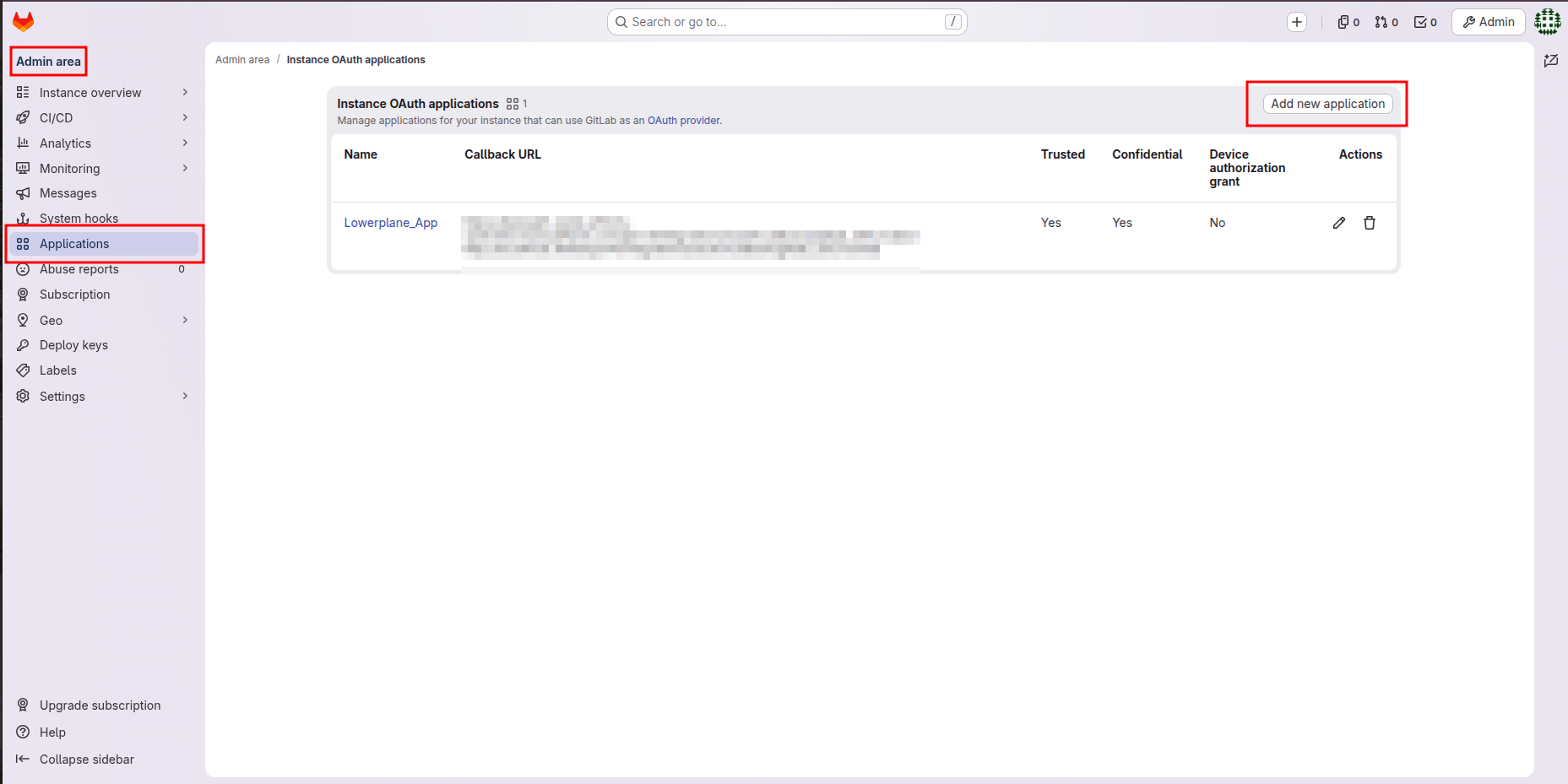 If you do not have instance administrator access, you can instead create the application under User Settings → Applications, or under Group → Settings → Applications for a group you own. All three work. LowerPlane only needs the resulting Application ID and Secret.
Fill in the application form
Complete the Add new application form as shown below.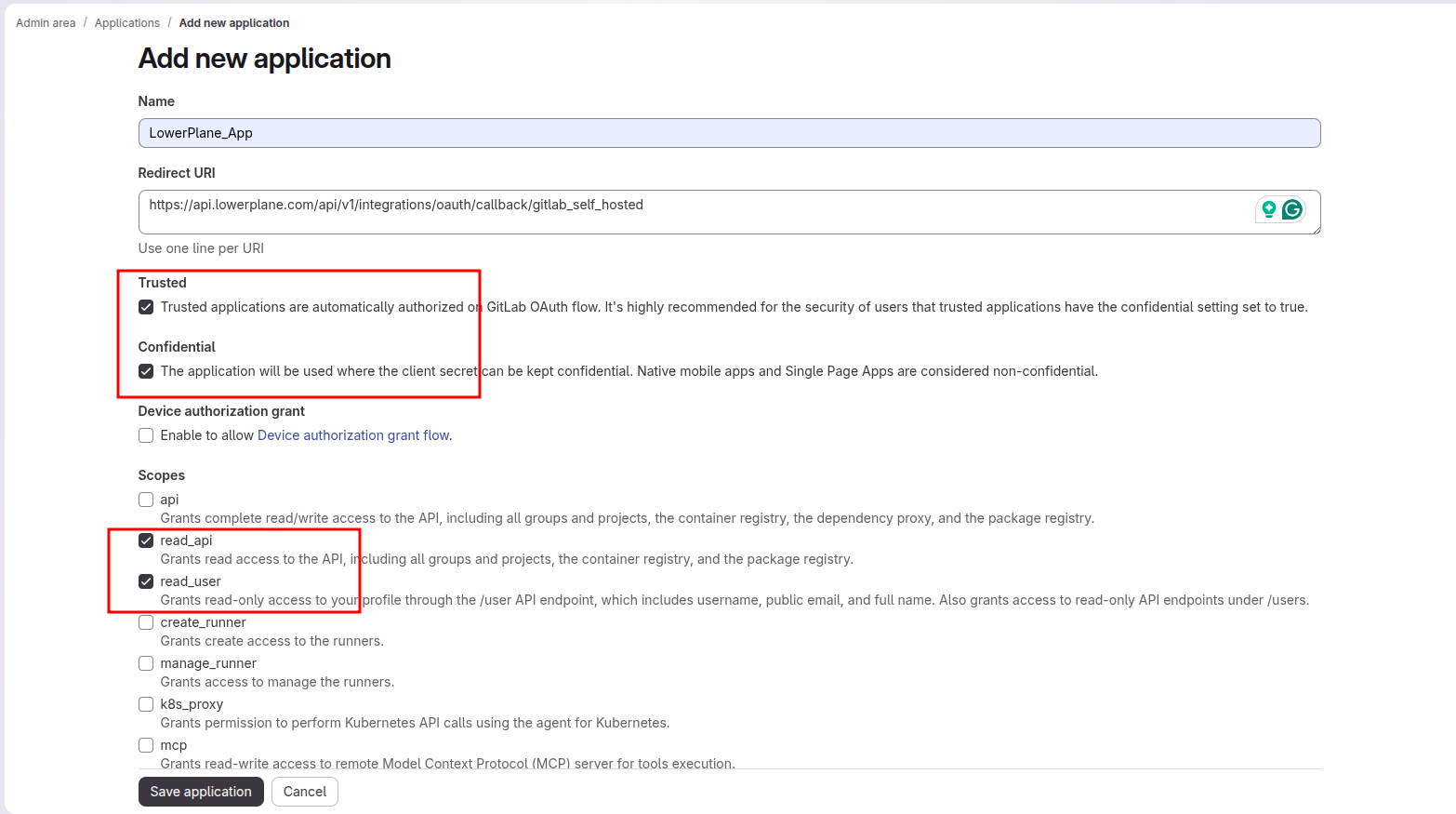 Name: enter a name your team will recognize, for example Checkboxes:
Scopes: select only these two:
LowerPlane_App.Redirect URI: enter exactly:| Option | Setting | Why |
|---|---|---|
| Trusted | Enabled | Trusted applications are authorized automatically, so your users don’t see a consent screen on every connection. |
| Confidential | Enabled | LowerPlane authenticates with a client secret. Clearing this breaks the token exchange. |
| Device authorization grant | Disabled | Not used by LowerPlane. Leave it unchecked. |
read_api: grants read access to the API, including groups and projectsread_user: grants read-only access to the user profile
Save and copy the credentials
Click Save application. GitLab confirms the application was created and shows the Application ID and Secret.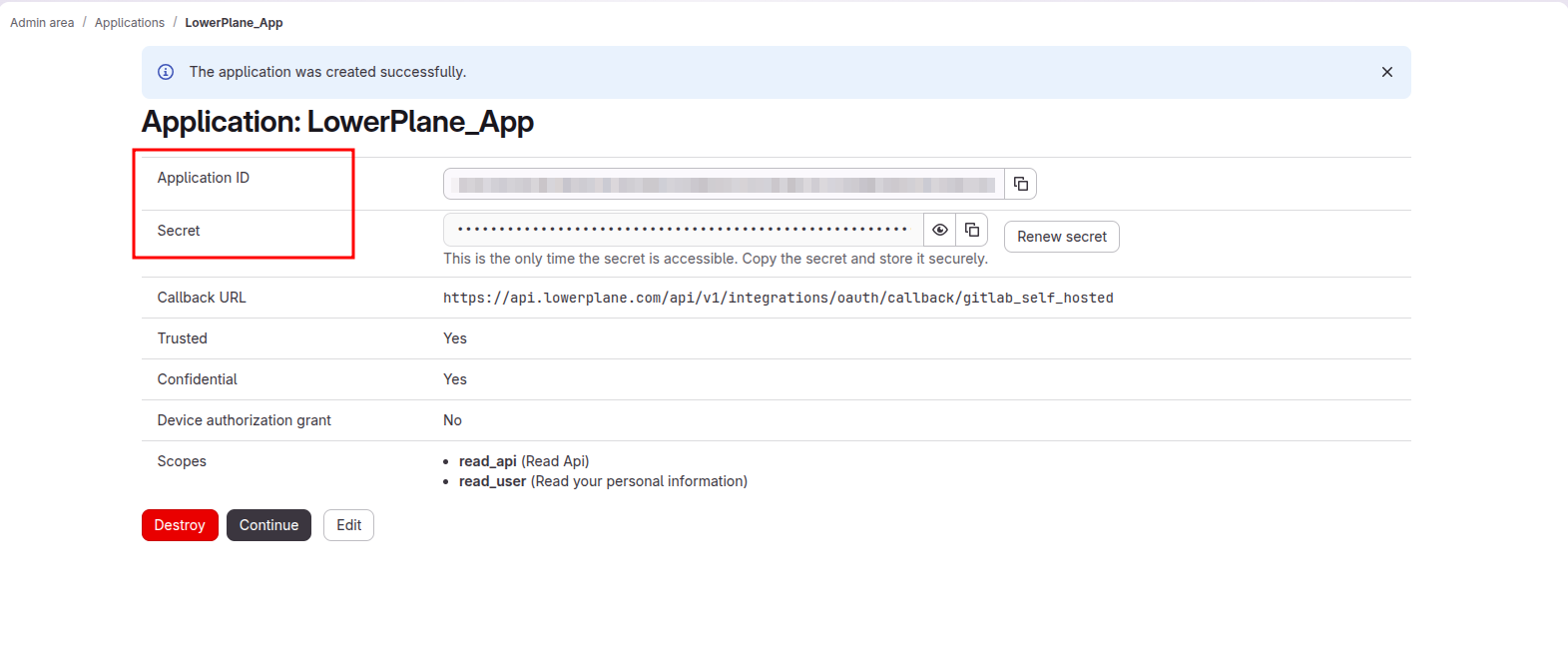 Use this page to confirm the application is correct before continuing: Callback URL should match the Redirect URI above, Trusted and Confidential should both read
Yes, and Scopes should list only read_api and read_user.Step 2: Connect in LowerPlane
Open the integration
In LowerPlane, go to Settings > Integrations, find GitLab Self-Managed in the Version Control category, and click Connect.
Fill in the connection details
Three fields appear:
| Field | What to enter |
|---|---|
| Hosted service URL | Your instance domain without http:// or https://. If your instance is at https://gitlab.yourcompany.com, enter gitlab.yourcompany.com. |
| Application ID | The Application ID from Step 1. |
| Client Secret | The Secret from Step 1. |
Authorize on your instance
Click Connect with GitLab Self-Managed. You’ll be redirected to your own instance’s authorization page. Review the requested scopes and click Authorize.Sign in as the account that owns the groups you want covered. The connection inherits that account’s visibility, so LowerPlane can only see projects and groups that this account can see.
Troubleshooting
The redirect URI included is not valid
The redirect URI included is not valid
The Redirect URI on your GitLab OAuth application does not match what LowerPlane sends. Open Admin Area → Applications, edit the application, and confirm the value is exactly:Check for a trailing slash, a missing
/v1, http instead of https, or a copied leading space.Connection fails right after clicking Connect
Connection fails right after clicking Connect
- Re-check the Application ID and Client Secret for truncation or trailing whitespace.
- Confirm the Confidential checkbox is enabled on the GitLab application. A non-confidential application will not accept the client secret.
- Confirm the Hosted service URL points at the instance where you created the application.
Hosted service URL is rejected
Hosted service URL is rejected
- Remove
http://orhttps://and any trailing slash. - Confirm the host resolves publicly and serves a valid TLS certificate. Self-signed certificates are not accepted.
No projects appear after connecting
No projects appear after connecting
LowerPlane sees only what the authorizing account can see. Confirm that account is a member of the groups and projects you expect, then trigger a manual sync from Settings > Integrations > GitLab Self-Managed.
Group MFA test reports a permissions problem
Group MFA test reports a permissions problem
GitLab returns a group’s
require_two_factor_authentication flag only to group Owners. Reconnect the integration using an account that is an Owner of that group, or mark the test as manually verified if owner access cannot be granted.The connection stopped working after a while
The connection stopped working after a while
GitLab access tokens expire, and LowerPlane renews them automatically using the stored refresh token, so expiry alone will not break the integration.A connection that stops working usually means the OAuth application was deleted, its secret was regenerated with Renew secret, or the authorizing account lost access to the groups. Reconnect the integration to re-authorize.
Merge Request Reviews & Pipeline Status
LowerPlane collects approver names on merge requests and pipeline status results to verify that peer review and CI/CD gates are enforced before merging. This data is used by the “Code changes should be reviewed by peers” and “Merging should require passing status-checks” tests.Data Access
| Data Type | Access |
|---|---|
| Project metadata | Read |
| Branch protection rules | Read |
| Merge request reviews & approvers | Read |
| Pipeline status checks | Read |
| Group members | Read |
| Group 2FA enforcement flag | Read (requires the authorizing account to be a group Owner) |
| Source code / file contents | No access |
| Commit history / diffs | No access |
| Issues / discussions | No access |